

Learn how to check your Scapia Credit Card application status using your application ID, PAN or mobile number and understand the next steps.
Apply for the Scapia Credit Card
Zero Forex Markup on international spends, unlimited domestic lounge access, and Lifetime Free guarantee.
If you have applied for a Scapia Credit Card, you can track your application status online using your application ID, PAN or registered mobile number.
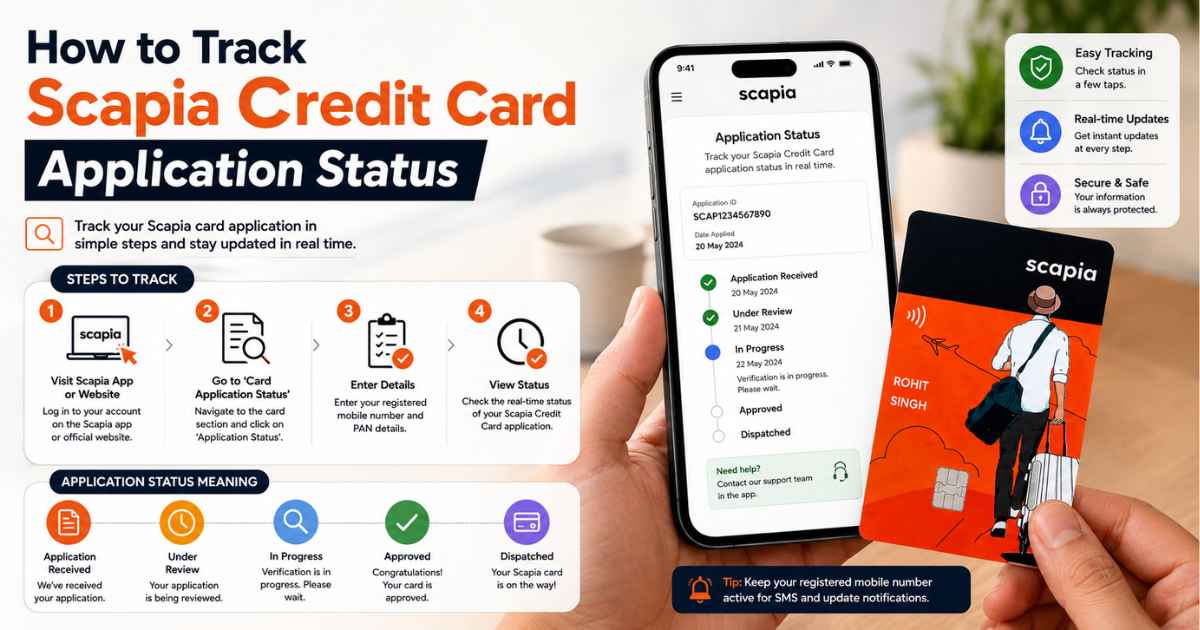
Your application ID is generated during the application process after initial OTP verification. It is also sent to your registered mobile number and email address, making it easier to find if you need to check your application later.
This guide explains how to check your Scapia Credit Card application status, what to do if you cannot find your application ID and what you should know after approval.
How to Check Scapia Credit Card Application Status
You can check your Scapia Credit Card application status online with any one of these details:
- Application ID
- PAN
- Registered mobile number
The tracking process is useful if you want to see the latest available update without submitting another application.
Steps to Check Your Scapia Card Status
Follow these steps:
- Open the application-status tracking facility.
- Select the identification method available to you.
- Enter your application ID, PAN or registered mobile number.
- Submit the required details.
- Check the status displayed for your application.
Use the same details that you provided during the application process to avoid verification issues.
What Is a Scapia Application ID?
The application ID is the unique reference number associated with your credit card application.
It is generated during the application journey after the initial OTP verification. The application ID is also sent to your registered email address and mobile number.
Keep this number saved until your application has been fully processed. It can make future status checks easier.
Can I Check Scapia Application Status Without an Application ID?
Yes. You can check your application status using your PAN or registered mobile number if you do not have your application ID available.
This is useful if you have deleted the SMS or cannot find the email containing your application reference.
Make sure the PAN or mobile number you enter is associated with the application you submitted.
I Cannot Find My Scapia Application ID. What Should I Do?
If you cannot find your application ID, first check the communication sent to you after submitting the application.
Look through:
- SMS messages on your registered mobile number
- Your registered email inbox
- Spam or junk email folders
- Older messages received around the time of application
The application ID is sent to the registered mobile number and email address after it is generated.
If you still cannot find it, you can use your PAN or registered mobile number to track the application instead.
What Does Scapia Credit Card Application Status Mean?
Your application status indicates the current stage of your credit card application.
Depending on where your application is in the process, it may still be undergoing verification or assessment. An approved application can move towards card issuance, while an unsuccessful application will not proceed to issuance.
A status check should therefore be treated as an update on your application rather than a guarantee of approval.
How Long Does Scapia Credit Card Approval Take?
There is no single approval timeline that applies to every Scapia Credit Card application.
Processing can depend on verification requirements and the information provided during the application. Additional checks may also affect how quickly an application moves through the process.
For this reason, avoid relying on an exact number of days as a guaranteed approval time.
If you are still deciding whether to apply, check the Scapia Credit Card eligibility criteria first.
What If Your Scapia Application Status Has Not Changed?
If your application status has not changed, check it again using your application ID, PAN or registered mobile number.
You should also check your registered email and SMS messages for any request for additional information or other communication about your application.
Avoid submitting another application simply because the existing application has not been updated. First check the status of the application you have already submitted.
Can I Track My Scapia Card After Approval?
Application tracking and card delivery tracking are different.
Application tracking tells you about the status of your credit card application. Once the card has been approved and dispatched, delivery information may be provided separately.
If you have already received your card, the next step is to complete the required activation process. You can follow our Scapia Credit Card activation guide for the steps involved.
What Should I Do After My Scapia Credit Card Is Approved?
After approval and card delivery, activate your Scapia Card before using it.
It is also useful to understand the card’s main features, charges and usage conditions before you start spending. Our Scapia Credit Card benefits and features guide covers the main benefits in one place.
If you applied mainly for travel benefits, you can also review the Scapia Credit Card lounge access rules before planning your airport visits.
What If Your Scapia Credit Card Application Is Not Approved?
If your application is not approved, review the information you provided and the eligibility requirements before considering another application.
Meeting the basic eligibility criteria does not guarantee approval because applications can be subject to additional assessment and verification.
You can review the Scapia Credit Card eligibility criteria to make sure you understand the currently stated requirements.
Avoid submitting repeated applications without understanding why the earlier application did not proceed.
Does Checking Scapia Application Status Affect Your Credit Score?
Checking the status of an existing credit card application is different from submitting a new application.
A status check does not itself mean that you have submitted another credit card application. Therefore, checking your existing application should not be confused with making a fresh credit application.
If your existing application is still being processed, check its status rather than immediately starting another application.
Scapia Credit Card Application Status: Important Points
Keep these points in mind when tracking your application:
- You can use your application ID, PAN or registered mobile number.
- The application ID is generated during the application process.
- The application ID is sent to your registered mobile number and email address.
- You do not need the application ID if you use your PAN or registered mobile number.
- Processing time can vary between applications.
- Application tracking is different from card delivery tracking.
- Completing an application does not guarantee approval.
- Avoid submitting another application simply because your existing status has not changed.
Scapia Credit Card Application Status FAQs
-
How can I check my Scapia Credit Card application status?
You can check your application status using your application ID, PAN or registered mobile number.
-
Where can I find my Scapia application ID?
You can check your application status using your application ID, PAN or registered mobile number.
-
Can I check Scapia application status using PAN?
Yes. PAN can be used to track your Scapia Credit Card application status.
-
Can I check my Scapia application status using my mobile number?
Yes. You can use the mobile number registered with your application to check its status.
-
How long does Scapia take to approve a credit card?
There is no single guaranteed approval period for every application. Most Scapia Credit Card applications are approved within 24 to 48 hours.
-
What should I do if my Scapia application status is not updated?
Check the application status again using your application ID, PAN or registered mobile number. Also check your registered SMS and email for any communication regarding your application.
-
Does checking my Scapia application status affect my credit score?
Checking the status of an existing application is different from submitting a new credit card application. The status check itself should not be treated as a fresh application.
-
What should I do after my Scapia Credit Card is approved?
After receiving your card, complete the required activation process. You can follow the Scapia Credit Card activation steps before using the card.
Final Takeaway
Checking your Scapia Credit Card application status is straightforward. You can use your application ID, PAN or registered mobile number to track the application.
If you cannot find your application ID, check your registered SMS and email first. You can also use your PAN or registered mobile number instead.
Remember that application tracking only shows the status of your application. It does not guarantee approval, and processing times can vary.