

Check your Scapia Credit Card application status in the scapia app. Every scapia application status explained, approval, delivery and dispatch tracking.
Apply for the Scapia Credit Card
Zero Forex Markup on international spends, unlimited domestic lounge access, and Lifetime Free guarantee.
You have applied for the Scapia Credit Card and now you are waiting. The good news: you do not need to visit a branch or call anyone to find out what is happening. The less obvious news: there is no standalone “track application” webpage for Scapia. Your tracker is the Scapia app itself, backed up by SMS and email updates from the issuing bank.
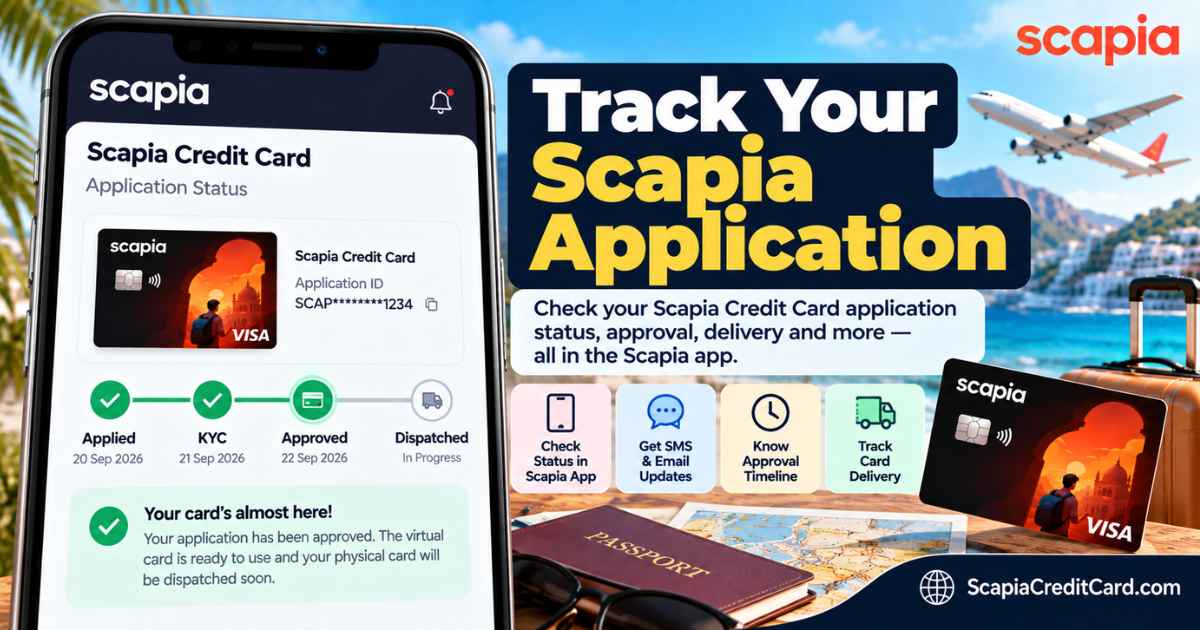
This guide shows you exactly where to check, what every status message means, how long each stage realistically takes, and what to do when your status seems stuck.
The Short Answer: Where to Check Your Status
- Primary method: Open the Scapia app and log in with your registered mobile number. Your application progress is shown on the home screen.
- Backup: Watch for SMS and email updates from Scapia and the issuing bank (Federal Bank, Axis Bank, or Bank of Baroda) at every major stage.
- Reference number: You receive an application reference number by SMS and email right after submitting. Keep it – it is your identifier if you ever need support.
- Typical decision time: 24 to 72 hours after video KYC, though many applicants hear back much sooner.
If you have not applied yet, start with the eligibility criteria so you apply once, with confidence.
How to Check Your Scapia Application Status (3 Methods)
Method 1 – The Scapia App (Recommended)
This is where your application lives. Download scapia app and open it. Log in with the mobile number you applied with, and the app shows your current stage – application received, verification in progress, approved, or card dispatched. If you started an application and did not finish it, logging back in usually resumes it from where you left off.
Keep the app updated. Several applicant-reported issues – including statuses that would not refresh – were resolved simply by updating to the latest app version or reinstalling.
Method 2 – SMS and Email Updates
You do not have to keep checking manually. The system pushes updates to your registered mobile number and email address at each milestone: application received, KYC verification, approval or rejection, virtual card issuance, and physical card dispatch (with courier details). Make sure the number you applied with can receive OTPs and promotional SMS – a DND-blocked number can delay the messages, though not the application itself.
Method 3 – The Issuing Bank’s Channels
Since the card is issued by a partner bank, the bank’s own credit-card tracking tools can sometimes show your application too. This is a backup method rather than the primary one – the bank’s portal tracks it under the bank’s application reference, and the Scapia app remains the most direct view. If the app gives you no clarity after several days, contacting the issuing bank’s credit card support with your reference number is a reasonable next step.
What Is Your Scapia Application ID (and Where to Find It)
Your application ID – also called the reference number – is generated the moment you submit your application. It is sent to you by SMS and email. You will need it if you contact support or use the bank’s tracking channels.
Lost it? Three ways to recover it:
- Check your SMS and email inbox (including spam) for messages from Scapia or the issuing bank around the date you applied.
- Log in to the Scapia app with your registered mobile number – your in-progress or completed application is tied to that number.
- Contact support with your registered mobile number and PAN – they can look up your application.
You cannot check your status using only your PAN on a public portal, because no such public portal exists for Scapia. The registered mobile number plus the app is the key.
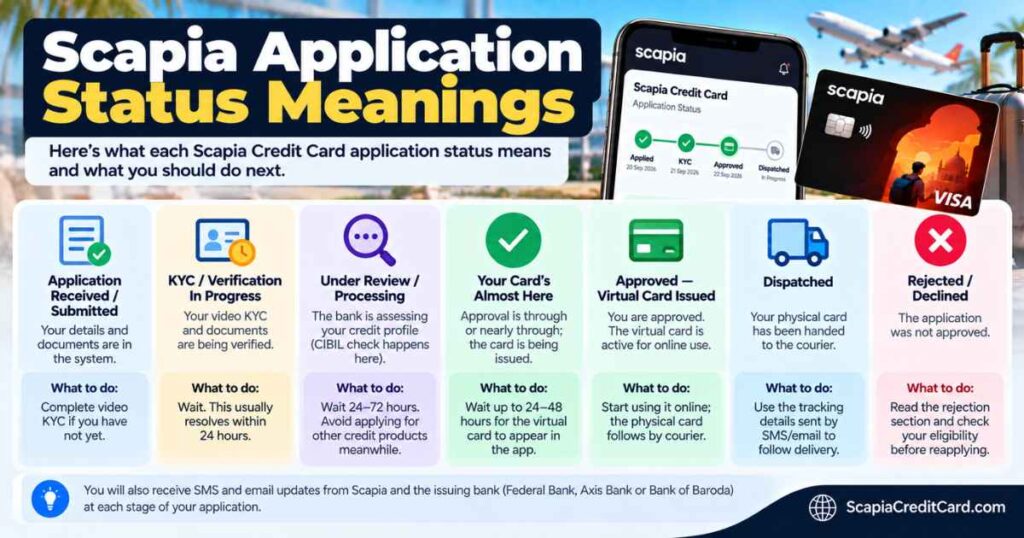
Scapia Application Status Meanings, Explained
| Status you see | What it means | What to do |
|---|---|---|
| Application received / submitted | Your details and documents are in the system. | Complete video KYC if you have not yet – nothing moves until you do. |
| KYC / verification in progress | Your video KYC and documents are being verified. | Wait. This usually resolves within 24 hours. |
| Under review / processing | The bank is assessing your credit profile (CIBIL check happens here). | Wait 24-72 hours. Avoid applying for other credit products meanwhile. |
| Your card’s almost here | Approval is through or nearly through; the card is being issued. This is the message that confuses people most – it is good news, not a problem. | Wait up to 24-48 hours for the virtual card to appear in the app. |
| Approved – virtual card issued | You are approved. The virtual card is active for online use. | Start using it online; the physical card follows by courier. |
| Dispatched | Your physical card has been handed to the courier. | Use the tracking details sent by SMS/email to follow delivery. |
| On hold | The bank needs something – often a document re-verification or an existing relationship review. | Check SMS/email for what is needed, or contact support. |
| Rejected / declined | The application was not approved. | Read the rejection section below before doing anything. |
The Scapia Application Timeline: What Happens When
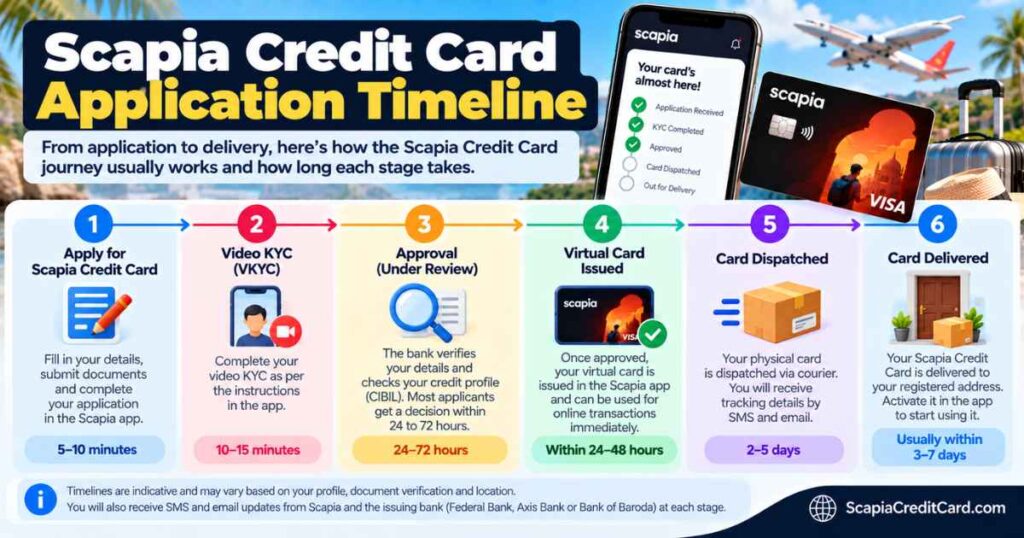
Timelines vary by applicant and issuing bank, but this is the realistic sequence based on widely reported experiences:
| Stage | Typical timing |
|---|---|
| Application submitted, reference number received | Immediately |
| Video KYC completed | 10-15 minutes, in-app |
| Verification and credit assessment | 4-24 hours |
| Approval decision | Within 24-72 hours of KYC (often much faster; some approvals land within minutes to a few hours) |
| Virtual card active in the app | Within ~24 hours of approval |
| Physical card dispatched | 4-6 days after approval |
| Physical card delivered | 2-7 working days after dispatch, depending on your location |
Note that the Axis Bank variant has been reported to approve eligible applicants near-instantly in some cases. Federal Bank timelines cluster around the 24-72 hour band. Either way, the virtual card is the fastest proof of approval – you do not need to wait for the physical card to start spending online. Once it arrives, follow our Scapia card activation guide to set your PIN.
After Approval: Virtual Card, Dispatch, and Delivery Tracking
Approval unlocks two cards on two timelines:
- Virtual card: appears in the Scapia app, usually within 24 hours of approval. It is ready for online transactions immediately – you can start earning Scapia Coins on eligible spends right away.
- Physical card: dispatched 4-6 days after approval. You will receive an SMS and email with the courier name and tracking number (deliveries are commonly handled by national couriers such as BlueDart). Use that tracking number on the courier’s website for live delivery status.
If dispatch details have not arrived a week after approval, check the app first, then contact support with your application reference number. Delivery to metro cities is often 2-3 days; remote PIN codes can take the full week. And remember the serviceability caveat from the start: if your PIN code is outside the bank’s coverage, the application can stall at the address stage – this looks like a stuck status but is really a coverage issue.
Status Stuck or Not Updating? How to Fix It
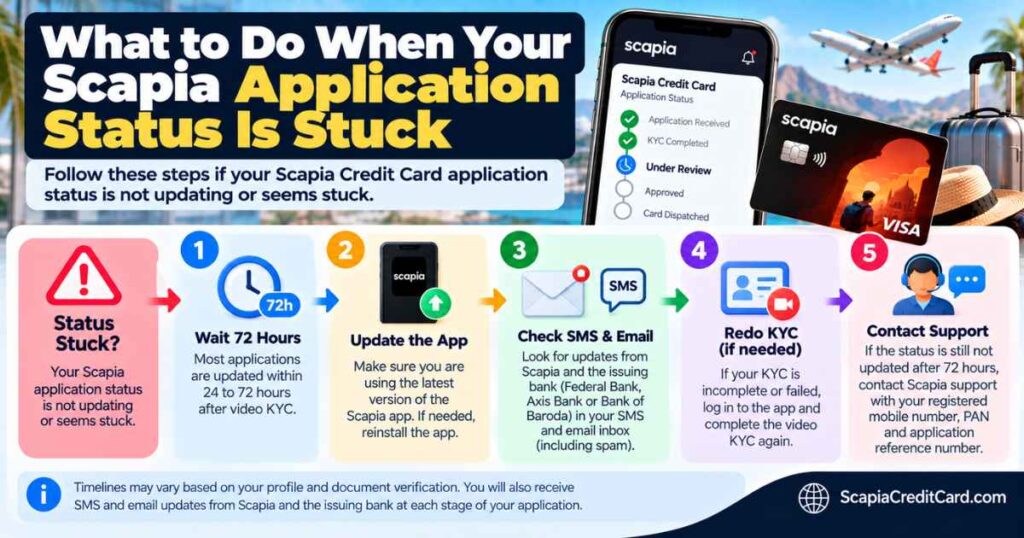
The most reported frustration is a status frozen on “Your card’s almost here” (or similar) for 48-72+ hours. Work through this checklist in order:
- Wait out the window first. Up to 72 hours after KYC is normal. Do not panic at hour 30.
- Update or reinstall the app. Stale app versions have caused statuses to freeze visually while the backend had already moved on. Log back in with your registered number afterward.
- Check SMS and email. The app display can lag behind the actual decision – your approval or document request may already be sitting in your inbox.
- Confirm KYC actually completed. If video KYC was interrupted (poor network, background noise, another person in frame), the application may be waiting on you, not the bank. Re-attempt KYC in a quiet room, alone, with good lighting.
- Check for an Aadhaar mismatch. Some applicants have been asked to update Aadhaar details in the bank’s records (via branch or netbanking) before the application could proceed. The app usually tells you this explicitly.
- Contact support. If 72+ hours have passed with no movement and no messages, reach out with your application reference number, registered mobile number, and the date you applied. Ask specifically whether the application is pending documents, under credit review, or on hold.
One thing not to do: submit a second fresh application while the first is still processing. Duplicate applications can complicate verification and add unnecessary credit inquiries.
If Your Application Is Rejected
Rejections arrive by SMS and email, sometimes with a reason. The most common ones for Scapia:
- Too many recent credit inquiries. Multiple applications in a short window signal credit hunger. Applicants report rejections with as few as 3-4 inquiries in recent months.
- Existing Federal Bank credit card. The one-card policy on the Federal variant – though applicant reports suggest this has evolved, with some existing Federal customers getting approved for the RuPay variant.
- Low credit score or thin credit history. The standard credit-policy decline.
- KYC or document mismatch. Name, address, or PAN details not matching across documents.
- PIN code not serviceable. A coverage decline, not a credit decline.
What to do next:
- Do not reapply immediately. Wait 3-6 months, fix the underlying issue (pay down utilisation, let inquiries age, correct documents), then try again.
- Consider a different variant. Rejected on the Federal Bank variant? The Axis Bank variant runs on a separate credit policy – many applicants rejected by one bank have been approved by another.
- Check your credit report. A rejection is a good prompt to pull your free CIBIL report and look for errors or unknown inquiries.
- Ask for the specific reason. Support can sometimes tell you more than the templated SMS, which helps you target the fix.
For the full picture on qualifying, see our eligibility guide, and if the card’s value proposition is what you are weighing, the detailed review and benefits breakdown will help you decide whether reapplying is worth it. Also review the fees and charges so you know exactly what the card costs (and does not cost) while you wait.
Frequently Asked Questions
-
How can I check my Scapia Credit Card application status?
Open the Scapia app and log in with your registered mobile number – your application stage is shown on the home screen. You will also receive SMS and email updates at each milestone, from submission through dispatch.
-
What is my Scapia application ID and where do I find it?
Your application ID (reference number) is generated when you submit the application and sent to you by SMS and email. If you lost it, search your messages from around your application date, or log in to the Scapia app with your registered number – the application is tied to it.
-
How long does Scapia Credit Card approval take?
Typically 24-72 hours after completing video KYC. Many applicants hear back sooner – some approvals arrive within minutes or hours, particularly on the Axis Bank variant.
-
What does “Your card’s almost here” mean in the Scapia app?
It means your application has cleared (or nearly cleared) approval and the card is being issued. It is good news. The virtual card usually appears in the app within 24-48 hours of this message.
-
How do I track my Scapia card delivery?
Once dispatched (usually 4-6 days after approval), you receive the courier name and tracking number by SMS and email. Enter that number on the courier’s website for live delivery status. Total delivery time is typically 2-7 working days depending on location.
-
My application status has not updated in days. What should I do?
First, allow the full 72-hour window after KYC. Then update or reinstall the app, check SMS/email for missed updates, and confirm your video KYC actually completed. If nothing has moved after 72 hours, contact support with your application reference number.
-
Can I check my application status without the application ID?
Yes – log in to the Scapia app with the mobile number you applied with. Your application is linked to that number, so you can see its status without the reference number. You only need the ID when contacting support or using the bank’s channels.
-
What should I do if my Scapia application is rejected?
Identify the likely reason (too many recent inquiries, existing Federal Bank card, low score, document mismatch, or unserviceable PIN code), fix it, and wait 3-6 months before reapplying. You can also try a different bank variant, since each issuer applies its own credit policy.